The Problem
You are reviewing a financial model and need to understand how each formula connects. Excel's built-in trace precedents shows one layer at a time and disappears when you click away.
The Solution
Tracelight's Trace feature maps the full precedent tree for any selected range in a single, navigable panel linked directly to your workbook.
How It Works
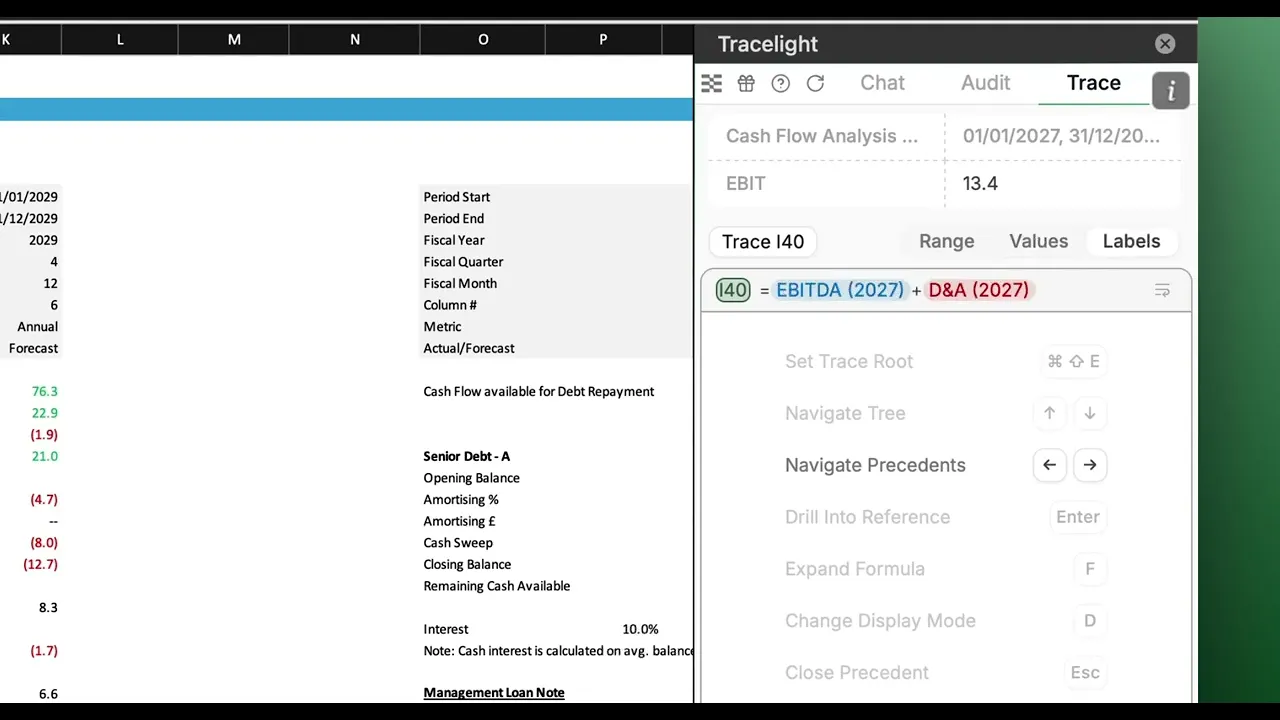
At the top of the screen, the range preview grid shows the value selected and its contextual location within the workbook. In the main window, a flat structure shows each formula as a row. Pick a row, and you can see how the precedent tree flows. The currently selected cell highlights, and can be clicked to navigate directly to that cell in the workbook. You can toggle between cells, values, and labels to show different perspectives.
At the bottom of the screen, a further explanation is hyperlinked to the precedent tree, explaining the formula. Since both are linked, it is easy to jump between the two for a complete understanding. You can use keyboard shortcuts to navigate through Trace using the left and right arrow keys.
Frequently Asked Questions
Q: How does AI formula tracing in Excel work with Tracelight
A: Tracelight's Trace feature maps the full precedent tree for any selected range, displaying each formula's inputs in a structured, clickable panel linked directly to your workbook cells.
Q: Can I navigate directly to cells from the Trace panel?
A: Yes. Every node in the precedent tree is clickable and navigates you directly to that cell in the workbook. You can also toggle between cells, values, and labels for different perspectives.
Q: How is this different from Excel's built-in trace precedents?
A: Excel's native tool shows one layer of arrows at a time and clears them when you navigate away. Tracelight presents the entire precedent chain in a persistent panel with plain-language explanations, direct cell navigation, and keyboard shortcuts for fast auditing.
Speak with our specialists
Contact Us