Industry
General
Use Case
General
The Problem
You have a large source dataset and need to summarise it quickly for analysis or a client deliverable. Building a pivot table manually is mechanical work: selecting the right fields, structuring the layout logically, applying consistent formatting. When the same dataset structure recurs across engagements or reporting cycles, you rebuild the same pivot from scratch each time.
The Solution
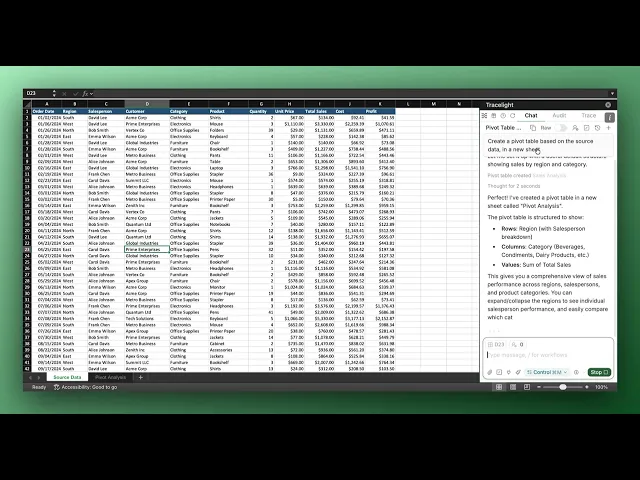
You describe what you need in plain English. Tracelight reads the source data, builds a properly formatted, fully functional pivot table in a new sheet, and prompts you to save that prompt as a reusable Workflow so the next run takes seconds.
Step 1: Build the Pivot Table from Source Data
You ask Tracelight to summarise the source data using a pivot table. Tracelight creates a new sheet, builds a logically organised pivot table, and applies clean formatting - ready for review without any manual adjustment.
Step 2: Save the Prompt as a Reusable Workflow
After delivering the pivot table, Tracelight surfaces a prompt to turn this into a saved Workflow. You press Create Workflow, confirm the pre-populated title and prompt, and it is stored in your Workflows library. The next time you need the same pivot table structure on a fresh dataset, you type / in a new chat, select the Workflow, and it runs immediately — no retyping required.
The Result
Pivot table creation that previously required manual field selection, layout decisions, and formatting now completes in a single saved prompt. Saved Workflows eliminate repetitive rebuild time, so the mechanical work disappears entirely and you stay focused on the analysis itself.
Frequently Asked Questions
Q: Does Tracelight work with any dataset, or only specific file types?
A: Tracelight works directly inside Excel, so it works with any data already in your spreadsheet - regardless of how it got there. Whether you imported a CSV or a PDF, pasted data manually, or pulled from an external source, Tracelight can read it and build from it.
Q: Can I use Saved Workflows across different Excel files?
A: Yes. Once you save a workflow, it lives in your Tracelight panel and is available in any Excel session. Just open a new file, hit forward slash, select your saved workflow, and run it - no retyping needed.
Q: Do I need any coding or technical experience to use Tracelight?
No. Tracelight is built for analysts who live in Excel, not developers. Everything runs through a plain English chat panel inside Excel — you describe what you want, and Tracelight builds it. No formulas to memorize, no macros to write, no setup beyond installing the add-in.
Speak with our specialists
Contact Us