Industry
General, Management Consulting
Use Case
General
The Problem
One of the most common questions we get is: "How do I prompt Tracelight well?"
It made us think - you shouldn't have to.
So we built Plan Mode, where Tracelight helps you figure out exactly how you want to build your model (check out the demo above to see it in action).
The Solution
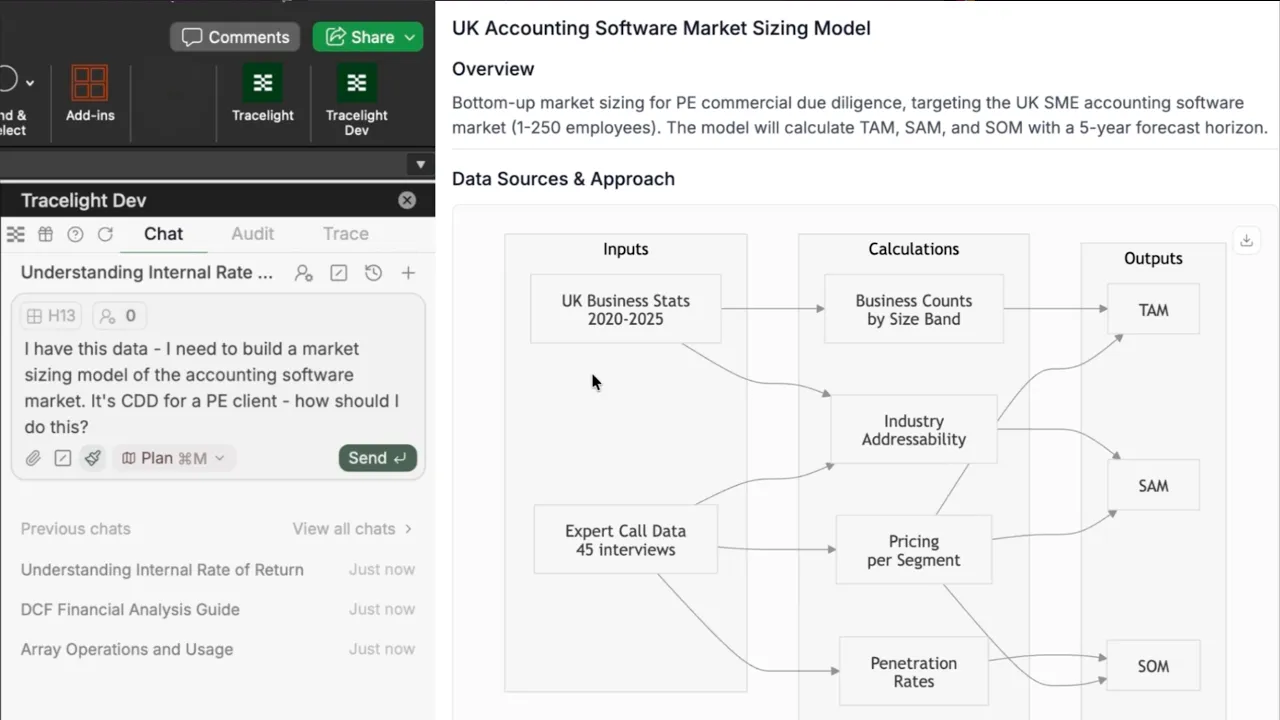
Tracelight's Plan Mode separates the thinking from the building. Before writing a single formula, you work through the model's logic with Tracelight: data sources, segmentation approach, forecast structure. Tracelight asks clarifying questions, produces a visual plan document for you to review and refine, and only builds once you've confirmed the specification.
Step 1: Scope the Model Together
You tell Tracelight what you're building — in this case, a market sizing model using industry data and expert call notes. Rather than building immediately, Tracelight gives you clarifying questions to customise the model plan according to your needs.
Step 2: Review the Visual Plan Document
Tracelight produces a structured plan document including our new mermaid graphs explaining how the model will work: the data flow between source tabs, the segmentation hierarchy, and how outputs will connect. You can review, push back, and iterate on the plan before a single formula is written. The model gets built to a specification you've already approved.
Step 3: Build to Specification
Once the plan is confirmed, Tracelight builds the model directly in your spreadsheet, structured exactly as designed.
The Result
You get a financial model built in minutes to a specification you've already sense-checked, not one you're reviewing for the first time after the fact. Because the architecture was agreed upfront, the output is clean and specific to your preferences on the first pass, streamlining your financial modeling work through personalisation.
Frequently Asked Questions
Q: Can AI help me build a market sizing model in Excel?
A: Tracelight's Plan Mode lets you scope the model's structure, data sources, and segmentation logic in plain English before any build begins. Once the plan is confirmed, Tracelight builds the model directly in your spreadsheet.
Q: What is Plan Mode in Tracelight?
A: Plan Mode is a pre-build scoping workflow where Tracelight asks clarifying questions and produces a visual plan document for your review. You iterate on the plan until it's right, then Tracelight builds to that specification.
Q: Can I see how my market sizing model will be structured before it's built?
A: Yes. Tracelight generates Mermaid diagrams in the plan document showing exactly how your model will be structured - data sources, segmentation logic, and output connections - before any formulas are written. You review and refine the diagrams until the architecture is right, then Tracelight builds to that specification.
Speak with our specialists
Contact Us