Industry
General
Use Case
General
The Problem
You're running a business plan assessment across multiple underlying business units. The inputs sit across a sprawl of PDFs and Excel files, each containing the operating plans, revenue assumptions, and cost build for a different unit. The deliverable is a consolidated view that lets the deal team interrogate the plans side by side. Without a workspace that holds all that context, every follow-up question means re-uploading files, re-explaining the brief, and rebuilding context from scratch.
The Solution
You create a Project in Tracelight, drop in every file related to the assessment, and work from a single workspace that retains full context. You direct Tracelight to build, summarise, or analyse across the underlying plans, and any subsequent question draws on the same source set without re-upload or repetition.
Step 1: Create the Project and Load Source Files
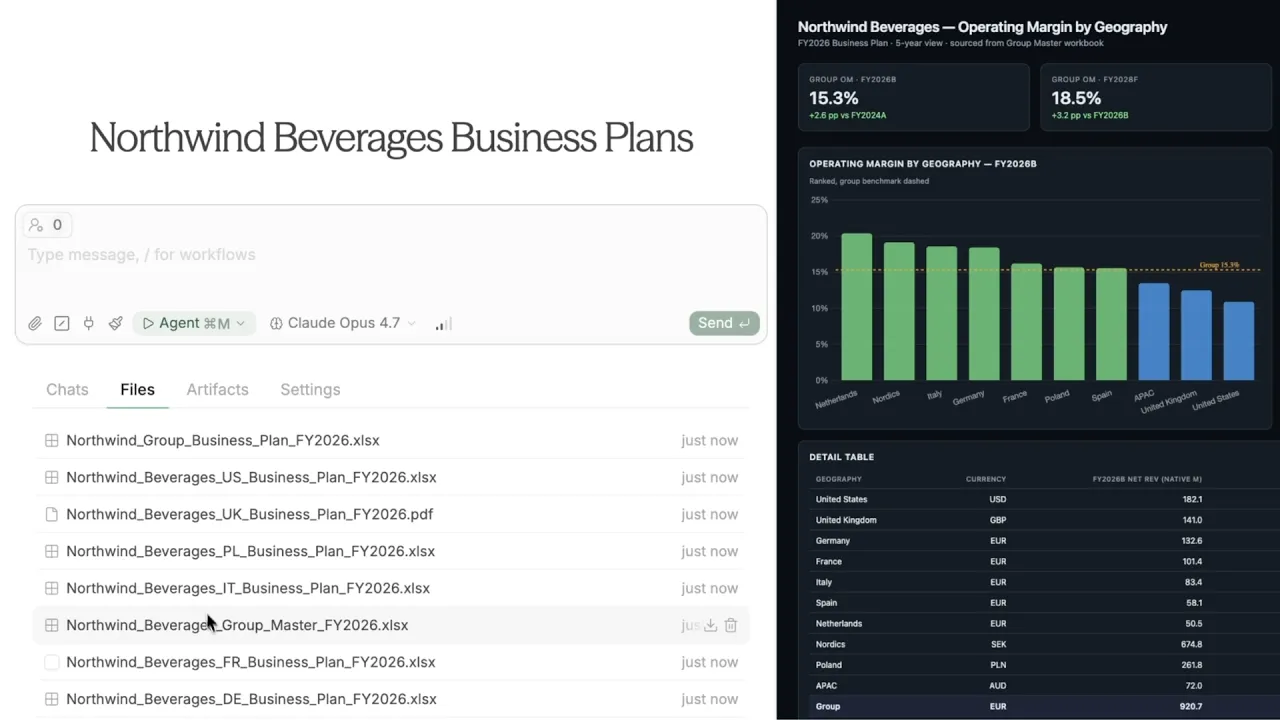
You create a new project in the add-in, name it after the engagement, and upload the underlying business plan files. PDFs and Excels covering each business unit sit together in one workspace, accessible to every subsequent prompt.
Step 2: Build the Consolidated Summary File
You ask Tracelight to build a summary file aggregating the information from each plan. Tracelight reads across the source documents and produces a single Excel file that consolidates the key figures, assumptions, and structure of each underlying business unit into one comparable view.
Step 3: Interrogate the Project Workspace
From the project workspace, every file and prior output remains in context. You ask a follow-up question, such as the underlying operating margins across the business units, and Tracelight consults the full source set without you re-uploading or re-explaining the brief.
Step 4: Generate an Artifact for Inspection
You ask Tracelight to surface the answer as an HTML dashboard. Tracelight produces the artifact directly, giving you a quick visual inspection of the underlying margins across business units, ready to share or interrogate further within the same project.
The Result
Project context that previously had to be rebuilt with every prompt now persists across the engagement. Files, chats, and artifacts stay in one workspace, and every follow-up question runs against the full source set, so you work faster on assessments where context compounds.
Frequently Asked Questions
Q: Can AI handle multiple files at once for financial modelling in Excel?
A: Yes. Tracelight projects let you load multiple PDFs and Excel files into a single workspace. Tracelight reads across all files when answering prompts, so you can build summaries, run comparisons, and ask follow-up questions without re-uploading source data.
Q: How does AI for Excel keep context across a project?
A: Tracelight projects store the files, chats, and artifacts for a given engagement in one workspace. Every prompt you run inside the project draws on the full set of inputs, removing the need to re-explain the brief or re-upload data when you ask follow-up questions.
Q: What kinds of artifacts can Tracelight generate from a project?
A: Tracelight can produce Excel outputs such as consolidated summary files, excel models, powerpoint presentations, as well as HTML dashboards for quick visual inspection, and more. All are generated from the same project context, so the underlying data and assumptions stay consistent across deliverables.
Speak with our specialists
Contact Us