Industry
General
Use Case
General
The Problem
You are pulling figures from a 200-page annual report into a working model. Revenue by segment, operating expenses, balance sheet items, segmental margins. Every number that lands in Excel needs to be defensible. When the MD asks where the FY24 EMEA revenue figure came from, "I think it was in the segmental breakdown" is not an answer. Manually, that means screenshotting tables, cross-referencing page numbers in cell notes, and re-checking every figure before sign-off.
The Solution
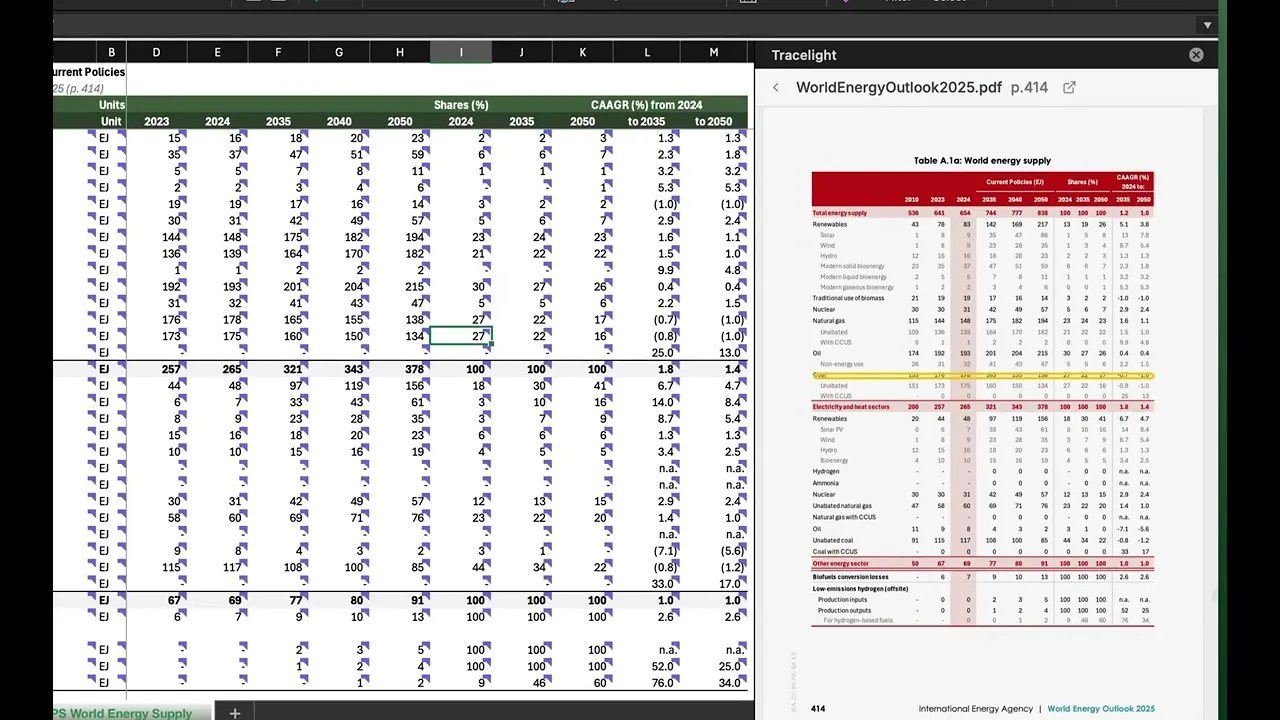
You drop the PDF into Tracelight and tell it which figures to extract into your model. Tracelight reads the source document, populates the Excel cells, and links each cell back to the exact table, row, and column in the original PDF. Click any cell and the source appears in a built-in PDF viewer, where you can see which Excel cell is pulling from which table section.
Frequently Asked Questions
Q: How does Tracelight cite PDF sources in Excel?
A: When Tracelight's Excel AI extracts data from a PDF into your Excel model, it preserves a link from each populated cell back to the exact table, row, and column in the original document. Clicking the cell opens a built-in PDF viewer with the source highlighted.
Q: Can I use Excel AI for financial modelling if my source data is in PDFs?
A: Yes. Tracelight reads PDFs directly, extracts the figures you need into Excel, and cites each cell back to its source table. This makes it suitable for workflows where every number must be auditable, including investment banking, consulting, and private equity.
Q: Is data extracted with Excel AI accurate enough for client-ready models?
A: Because every cell is linked to its source in the original PDF, you can verify any figure in seconds rather than relying on the extraction blind. This makes audit and sign-off faster while maintaining the standard expected on live deals.
Speak with our specialists
Contact Us